Search Engine Optimization (SEO) is an integral component of any successful online business. But if you’re an entrepreneur overwhelmed by the technical intricacies of website design and internet marketing, you might find SEO a bit daunting. Fear not! With the right tools and knowledge, it becomes significantly more manageable.
Understanding the Basics: How Search Engines Work
Search engines, like Google, Brave and Bing, use algorithms to crawl the web, indexing content to serve it to users. These algorithms consider multiple factors to rank sites. Keywords play a pivotal role, as they help search engines understand your content. SEO plugins for WordPress streamline this process, making it easy even for non-technical users to optimize their content.
Why Title Tags and Meta Descriptions Matter
When your site appears in search results, the title and snippet below it can greatly influence whether someone clicks on your link. Title tags define the title of a document, while meta descriptions offer a brief summary. Crafting compelling title tags and meta descriptions can significantly improve click-through rates, driving more organic traffic to your site.
Keyword Research: Finding the Right Phrases for Your Content
Keywords aren’t just about SEO; they’re about your audience. Understanding the terms that your ideal clients use can help you tailor content to their needs. There are various tools, like Google Keyword Planner or Ubersuggest, which offer insights into popular search terms. Embrace long-tail keywords – these are more specific phrases that are less competitive and can drive more qualified traffic. However, remember to incorporate keywords naturally into your content. Keyword stuffing can harm your rankings and user experience.
Write Well for Your Best Customer, without keyword stuffing
Writing effectively for your ideal customer means understanding their needs, values, and language. Craft content that speaks directly to them, offering genuine value and solutions to their problems. Prioritize clarity and relevance over trying to “game” search engines.
While keywords are important for SEO, they should be woven naturally into your content. Overloading your text with keywords, a tactic known as “keyword stuffing,” can harm readability and may even result in search engine penalties.
Always prioritize authentic communication over short-term SEO tricks.
Harnessing the Power of SEO Plugins
My top recommendation for an SEO plugin is “The SEO Framework – Fast, Automated, Effortless“. It offers an intuitive interface, automating most of the optimization tasks. Paired with the Redirection plugin, it can tackle most challenges thrown its way that the paid version of Yoast can handle. You can even import search engine metadata from Yoast if you have been using it.
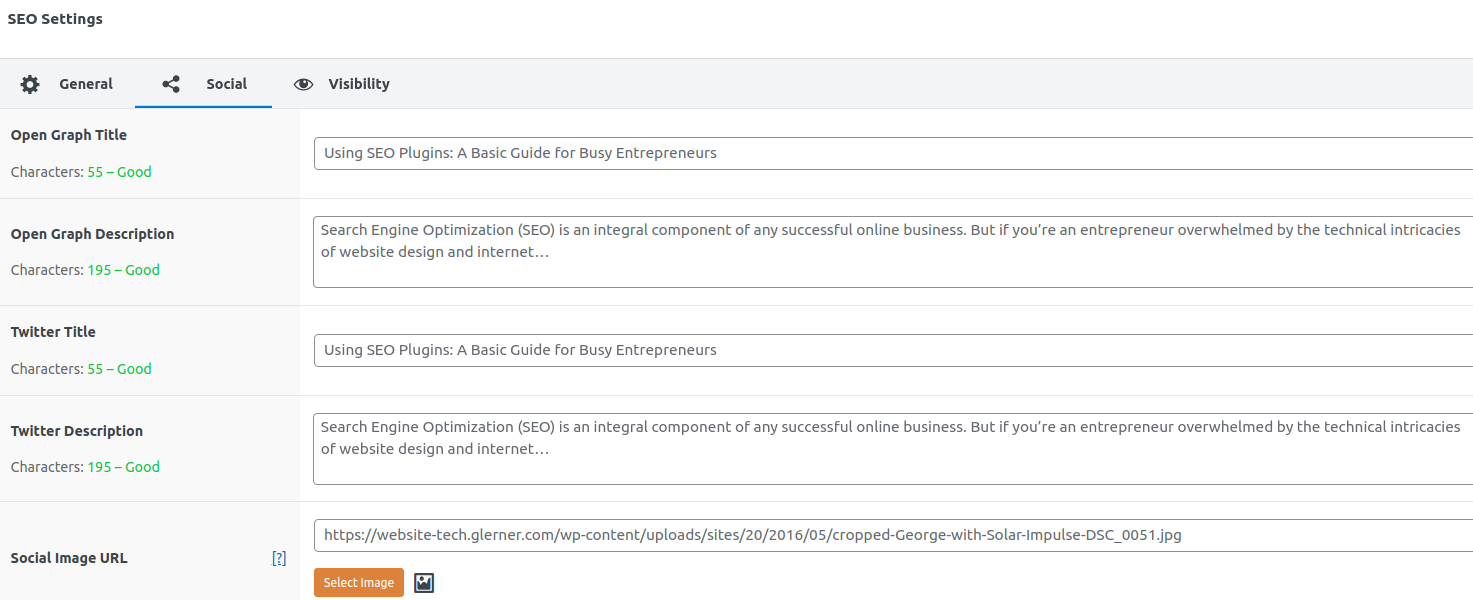
One of its standout features is the ability to let you tailor images for various social media platforms. The SEO Framework seamlessly supports and enables further customization of the Open Graph, Facebook, and Twitter Cards protocols. (Basically all social media sites use either the Facebook or Twitter extensions to OpenGraph, so you only need to set the image and description for those two.)
This means when you share your posts on social media platforms, you can specify text and images that align with each platform’s preferred dimensions.
If you don’t set a custom image, the plugin will default to using the post’s Featured Image (each social media site will crop or resize how it thinks is best) or a fallback image you set.
If you don’t set a custom description, each social media site will use your page’s Excerpt.
Whether you select an image and text specific for search engines + Facebook + Twitter, or use the default for the page, your content always looks its best wherever it’s shared.
Testing Your Google, Facebook, Twitter descriptions
To get a sense of how Google perceives your site, search for “site:yourdomain.com” on Google. This will display all indexed pages of your site. For a deeper dive, Google Search Console provides comprehensive analytics and insights.
Test with Facebook’s Open Graph Debugger
Test with Twitter Card Validator
Google Webmaster’s Cached HTML Improvements Report
Final Thoughts
Optimizing your WordPress site for search engines doesn’t have to be overwhelming. With the right plugin and a bit of guidance, you can effectively enhance your site’s visibility.
Focus on delivering value to your audience, understand their needs, and let the tools handle the technical side of things. Your vision of making a positive impact within your community through your online platform is not only achievable but also commendable.
Happy optimizing!