Tag: MX Toolbox

  • How to Identify Fake Email Senders and Understand Email Header Analysis

    How to Identify Fake Email Senders and Understand Email Header Analysis

    The point of this post is simple: Don’t believe anything based on an email’s “From” or “Reply To” fields.

    Don’t get indignant or even mildly annoyed. Don’t make any decision, based on “fakers!”, or based on getting suckered. Just press or click “Delete”.

    One of the decisions to avoid is “another spam from ___ sender, can’t trust them at all” (GMail, Apple Mail, any trusted source will be “fake used” by spammers, because they are a trusted source).

    Should you trace where your emails actually come from, like I show here? Nope! Waste of your time. Just get this fakery exists. (Do this for 1 or 2 emails, you’ll know you don’t have time for this…)

    How kind of “them”, they gave me an actual example to show.

    The “From:” field of an email is easily faked. Just like you can write anything on the outside of an envelope, the From field is an easy place for an email spammer to lie. The “Reply To:” field is easily faked too.

    This was delivered to my Spam folder: 

    Oh look, it is even “from a GMail account”, so we’re supposed to believe it is real.

    Is this email actually from a GMail account? No!

    Notice these things from the summary below: 

    transitioning domain of _spf.google.com does not designate 147.135.72.161 as permitted sender

         nope, phony sender

    smtp.mailfrom=george@gmail.com; dmarc=fail

         nope, phony sender

    from mtx1.gskrmail.com (mtx1.gskrmail.com [147.135.72.161])

         actual sender

    That equals “It was sent from gskrmail.com, not from GMail”.

    They “lied on the outside of the envelope”, putting a wrong “From” email address.

    This is from my email program’s summary of the email headers: 

    Authentication-Results
    mx.zohomail.com; spf=softfail (zohomail.com: transitioning domain of _spf.google.com does not designate 147.135.72.161 as permitted sender) smtp.mailfrom=george@gmail.com; dmarc=fail(p=none dis=none) header.from=gmail.com
    
    Received
    from mtx1.gskrmail.com (mtx1.gskrmail.com [147.135.72.161]) by mx.zohomail.com with SMTPS id 17050598302871018.8032972489663; Fri, 12 Jan 2024 03:43:50 -0800 (PST)

    In the “full headers” I can see these:

    Received-SPF: softfail (zohomail.com: transitioning domain of _spf.google.com does not designate 147.135.72.161 as permitted sender) client-ip=147.135.72.161;

          phony

    envelope-from=george@gmail.com; helo=mtx1.gskrmail.com;
    dmarc=fail(p=none dis=none) 

         phony, envelope lie, actual “Hello” is gskrmail and no, that is not my GMail address.

    Easy Analysis of Email Headers

    https://mxtoolbox.com/EmailHeaders.aspx

    Paste the “full headers” of your email. Your email software has a way to “Show Source” or “View Original Headers”, or something like that.

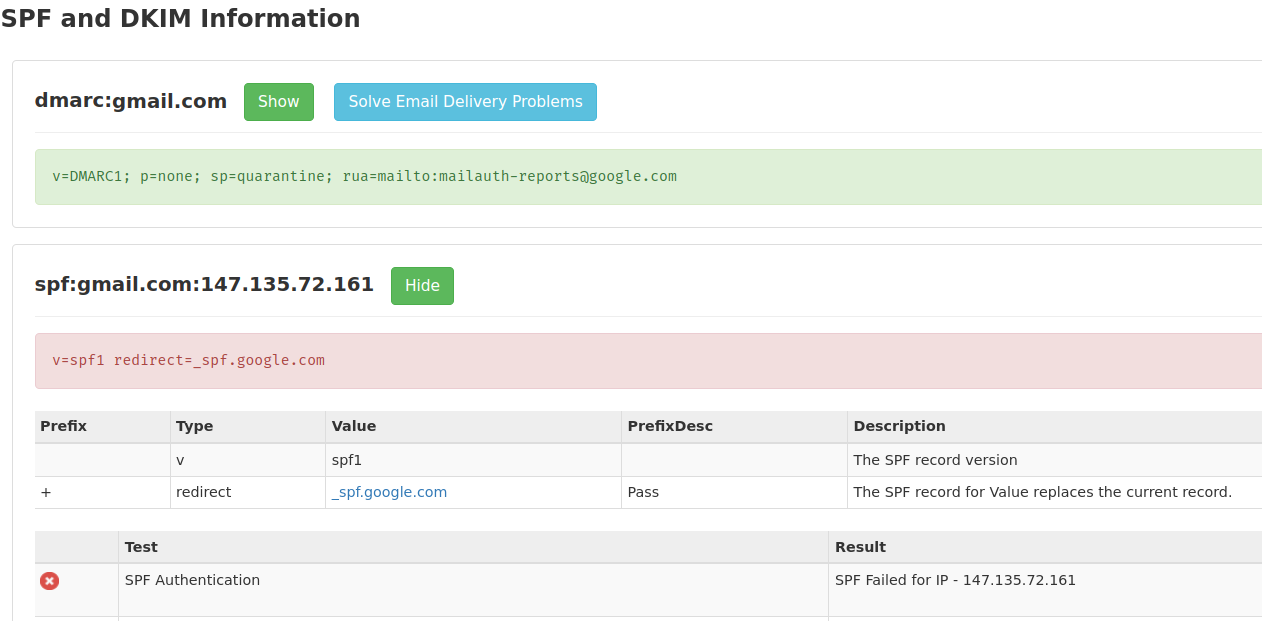
    Nope, not from GMail, but from gskrmail

    and it shows the sender is “On a Blacklist”, a known spammer.

    MXToolbox.com analysis of a spammer's email headers, showing the SPF Authentication failed

    Nope, not from GMail, the email failed the SPF Authentication.

    What To Do About Phony Senders?

    Hopefully, your email program now alerts you when an email sender is unverified.

    Don’t waste your time following up on these suspicious emails.

    Just click “Delete” or “Spam” or “Phishing” (whichever you think is best) in your email program.

    What Should You Pay Attention To?

    Pay attention to what you want for your family.

    Pay attention to what you want for your neighborhood, for your groups, for your closest friends.

    You are more likely to get what you pay attention to.

    Don’t pay attention to what gets you irate, indignant. Those emotions are addictive. “They” want you addicted, because every addict believes anything their drug dealer says.

    When you are addicted, you can not pay attention to anything else.

    Corporations want you to “buy more”, whether it is good for your family or not.

    Too many politicians want you to “vote me into power”, not caring about your family at all.

    Email spammers either want you to buy from a corporation, or vote for a power-greedy politician, or help them (the spammers & hackers) commit a crime.

    Pay attention, instead, to what you want for your family and who will help you have what you want for your family.

  • Enhancing Email Deliverability for Your WordPress Website

    Ensuring seamless communication between your business and your customers is crucial. One important aspect of communicating is the “deliverability of emails” sent from your WordPress website.

    These emails include WooCommerce order confirmations, password reset requests, or any other transactional emails.

    Here are some key steps to consider, to enhance the email deliverability for your WordPress website:

    1. Utilize an SMTP Plugin:
      • Many email providers require proper validation to ensure that you (or in this case, your website) are the authorized sender of the emails. Utilizing an SMTP (Simple Mail Transfer Protocol) plugin such as WP Mail SMTP can facilitate this by connecting your WordPress website to a reputable email hosting service.
    2. Choose a Reputable Email Host:
      • Good email hosts like GMail, Outlook, Brevo, and Zoho Mail are preferred as they have robust mechanisms to ensure email deliverability. They require setting up specific email authentication records like DMARC, DKIM, and SPF which help in verifying the sender’s identity.
      • Sending emails from your website is not as good, even if your website hosting company also provides email hosting. Email hosting is an “aside” for website hosting companies; pay the small monthly fee for an excellent email host.
    3. Email Authentication:
      • Set up necessary email authentication records:
        • SPF (Sender Policy Framework): Helps prevent email spoofing by specifying which IP addresses are allowed to send emails on behalf of your domain.
        • DKIM (DomainKeys Identified Mail): Allows receiving email servers to confirm that an email claiming to come from a specific domain was authorized by the owner of that domain.
        • DMARC (Domain-based Message Authentication, Reporting & Conformance): Builds on SPF and DKIM protocols, adding linkage to the author (“From:”) domain name, published policies for recipient handling of authentication failures, and reporting from receivers to senders, to improve and monitor protection of the domain from fraudulent email.
        • Your email hosting company can guide you in how exactly to configure these, for settings on their system and settings with your Domain Name Registrar.
    4. Configure Your Domain Properly:
      • Ensure your domain name settings (DNS records) are correctly configured with your email provider to ensure smooth email deliverability. Tools like MX Lookup Tool – MxToolbox can help verify your DNS settings.
    5. Avoid Sending Emails from Hosting Provider:
      • It’s often not advisable to send emails directly from your website hosting server (unless it’s specifically configured for email hosting). Doing so may lead to poor email deliverability.
    6. Monitor Email Deliverability:
      • Use tools and services that provide insight into your email deliverability performance, such as open rates, bounce rates, and spam complaints. This data can provide valuable insights and alert you to potential issues before they affect your communication with your customers.
    7. Maintain a Clean Mailing List:
      • Regularly update and clean your mailing list to remove invalid or inactive email addresses. This will help improve your sender reputation and overall email deliverability.
    8. Stay Updated on Best Practices:
      • Email deliverability standards and best practices evolve. Stay updated on the latest recommendations and ensure your WordPress website’s email configuration remains compliant and optimized for deliverability.

    By taking these steps, you will significantly improve the chances of your emails reaching your customers’ inboxes, thereby ensuring better communication and enhancing customer satisfaction.

    Should you have any further questions or need assistance with improving your email deliverability, feel free to reach out to me or leave a comment.