Tag: .htaccess

  • Security — Block Executing Files Uploaded in wp-content/

    One of the most common hacker techniques on WordPress sites is to find a plugin that has a vulnerability, and use that plugin to upload an initial malware file onto your site. The hackers would then access the malware file directly (bypassing WordPress) to install any malware they want, and/or access your database. Hackers know the most common place plugins would put files is in your WordPress wp-content/uploads/ folder. You must Block executing files in your wp-content folder.

    There are folders such as wp-content/plugins/ and wp-content/themes/ where you should allow files to execute (or your plugins and theme won’t work). You could even get more specific, and enable just the folders that each plugin specifically uses. However, that is more maintenance work for you; let a top security plugin (WordFence) take care of that for you.

    You Must Protect Your Uploads Folder

    This is a serious security issue. One reason you must do plugin updates frequently, is plugin authors (well, the good ones, at least) will patch security issues as soon as anyone informs them. That’s because there are security people who check the hacker’s bulletin boards for issues the hackers are bragging about, and alert the plugin authors.

    Here is an example of the kind of hacker junk you would see if your security software were capturing the information:

    errorstatuserrortriggerrequriquerystringuseragentcookiesallowheaderspostvariables
    403badRequestString:wpcontent/wp-content/plugins/work-the-flow-file-upload/public/assets/jQuery-File-Upload-9.5.0/server/php/index.php Mozilla/5.0 (Windows NT 6.1; rv:34.0) Gecko/20100101 Firefox/34.0 Accept: */* Accept-Encoding: gzip, deflate–31aa900beb174efa942c7958119e7885
    Content-Disposition:_form-data;_name–>”action”upload
    –31aa900beb174efa942c7958119e7885
    Content-Disposition: form-data; name=”files”; filename=”wp-classes.php”
    Content-Type: text/plain–31aa900beb174efa942c7958119e7885–
    403badRequestString:wpcontent/wp-content/plugins/work-the-flow-file-upload/public/assets/jQuery-File-Upload-9.5.0/server/php/index.php Mozilla/5.0 (Windows NT 6.1; rv:34.0) Gecko/20100101 Firefox/34.0 Accept: */* Accept-Encoding: gzip, deflate–f2ee98a757e94b9897a2c9b1a9ffa74f
    Content-Disposition:_form-data;_name–>”action”upload
    –f2ee98a757e94b9897a2c9b1a9ffa74f
    Content-Disposition: form-data; name=”files”; filename=”wp-classes.php”
    Content-Type: text/plain
    –f2ee98a757e94b9897a2c9b1a9ffa74f–

    What Do These Columns Mean?

    ErrorStatus 403 means “Forbidden”, the server or hosting account security rules are blocking this.

    ErrorStatus 404 means “File Not Found”, but there is nothing forbidding them accessing the file if it did exist.

    (If the requested file did exist, the hackers found a file that, at least in some version of the file, they think had a vulnerability; you wouldn’t see an error. Your site access log would have the file name with an ErrorStatus 200 “OK”, or 304 “Not Modified”.)

    ErrorTrigger is my security system letting me know what caused this to be blocked, in this case the use of “wp-content” in the Request String.

    Requri is the Request String, in this case beginning with “/wp-content/plugins/work-the-flow-file-upload”. So we guess that some version of the “Work The Flow File Upload” plugin had a vulnerability (because somebody, probably a hacker, was looking for it). We don’t know that the current version of the plugin is flawed, we know that hackers are interested in some version of the plugin.

    This plugin looks risky, in the description at https://wordpress.org/plugins/work-the-flow-file-upload/faq/ . However, know that all plugin authors can mess up and allow a hacker to gain access beyond the plugin author’s intentions.

    You want to specifically block hacker behavior, and only attempt to guess whether the plugin author is to be trusted while you decide whether to install a plugin.

    In this example, simply the attempt to access program files directly in wp-content/ is enough to conclude the request is by a hacker. Only images or music or video should ever be accessible directly, in wp-content/uploads or any sub-folders.

    Query String is, in these examples, not used. If you type a URL in, and it has a question mark in it, everything after the question mark is the query string. For the URL http://computerhelp.lc.lndo.site/wp-admin/post.php?post=abcde&action=edit the query string is “post=abcde&action=edit”.

    User Agent is used by all software that accesses web pages, letting the server know what capabilities or special formatting to use. Some hackers use web bots with unique names, “bragging” about who they are; these can be blocked by the user agent. In this case, it’s simply Firefox version 34. If there is the word “semalt” or “nutch” or “ImageSucker” in the User Agent, those are known baddies. You can find several lists of user agents, e.g. http://www.useragentstring.com

    Cookies aren’t set here. Hmm, if they were actually using WordPress, there would be several cookies set. So, this is another clue they are hackers.

    Allow Headers: These are meant to be used to let the server know what language the browser prefers, for example “I want to read the French version of the page if you have one, but if not I’ll take British English or any other version of English”. Similarly, the header is used to indicate if the browser can take compressed output. In this case, no foreign language preferences, and can use gzip or deflate for compression. Nothing to look at here, in this example, for security; this is useful for troubleshooting other types of problems.

    Post Variables: Every form you fill out on the Internet uses Post Variables (or rarely, the URL) to submit the data. In this case, the “Action” is “Upload” (the hacker is submitting a file for the server to upload), and the file name is “wp-classes.php”. Well, that looks like a legitimate file name, right? Wrong! This is being uploaded, which is a definite give-away, but if you didn’t catch the upload the hackers are hoping you won’t notice a file with a name that looks legitimate.

    How Do I Block Files Uploaded to wp-content/

    The easiest way is use a good security plugin such as WordFence (my preference) or iThemes Security (doesn’t include a Web Application Firewall in the free version, and sends useless emails to me, for example “file changes found”). Both will do far more than block uploading executable files and block executing files in wp-content. Definitely use either WordFence or iThemes Security

    If you want to modify your own .htaccess file? Don’t, it’s a lot more work! Okay, if you really want to, here’s what I use, including setting a server environment variable that my error page can read:

    SetEnvIf Request_URI (?i)^/wp-content/(.*)$  badRequestString=wpcontent
    SetEnvIf Request_URI (?i)^/wp-content/themes/(.*)\.(css|js|gif|jpg|jpeg|png|eot|svg|ttf|woff)$  !badRequestString
    SetEnvIf Request_URI (?i)^/wp-content/plugins/(.*)\.(css|js|gif|jpg|jpeg|png|eot|svg|ttf|woff)$  !badRequestString
    SetEnvIf Request_URI (?i)^/wp-content/uploads/(.*)\.flv$  !badRequestString
    SetEnvIf Request_URI (?i)^/wp-content/uploads/(.*)\.gif$  !badRequestString
    SetEnvIf Request_URI (?i)^/wp-content/uploads/(.*)\.jpg$  !badRequestString
    SetEnvIf Request_URI (?i)^/wp-content/uploads/(.*)\.jpeg$  !badRequestString
    SetEnvIf Request_URI (?i)^/wp-content/uploads/(.*)\.m4v$  !badRequestString
    SetEnvIf Request_URI (?i)^/wp-content/uploads/(.*)\.mp3$  !badRequestString
    SetEnvIf Request_URI (?i)^/wp-content/uploads/(.*)\.mpeg$  !badRequestString
    SetEnvIf Request_URI (?i)^/wp-content/uploads/(.*)\.mpg$  !badRequestString
    SetEnvIf Request_URI (?i)^/wp-content/uploads/(.*)\.png$  !badRequestString
    SetEnvIf Request_URI (?i)^/wp-content/uploads/(.*)\.pdf$  !badRequestString
    SetEnvIf Request_URI (?i)^/wp-content/uploads/(.*)\.txt$  !badRequestString
    SetEnvIf Request_URI (?i)^/wp-content/cache/supercache/(.*)$  !badRequestString
    Order Allow,Deny
    Allow from all
    Deny from env=badRequestString

    I make exceptions for style sheets and images and fonts in your theme folders and plugin folders; and for images, pdf files, text files, movies in your WordPress uploads folder (the WordPress Media Library folder). You also should allow cache files (I’m no longer using WP Super Cache, my hosting provider has better).

    Want Me to Check Your Security and Do Regular Maintenance?

    I do WordPress Ongoing Maintenance and Security for small business sites, making sure your site runs smoothly and is safe from most hackers. I can’t block the CIA (or Russian, Chinese, etc equivalent) from getting in, but I can thwart many hacking attempts at the WordPress and Plugin level. I have your site run quickly, and without errors. I can make sure your pages are showing up well in social media sites, including Facebook, Twitter, LinkedIn, Pinterest.
  • Blocking Access to the Most Important WordPress Files, including .htaccess, wp-config.php

    Blocking Access to the Most Important WordPress Files, including .htaccess, wp-config.php

    There are several files that are part of every web site hosting account, that must be kept secret for security. Hackers are very interested in these files, as they contain key information about your hosting account and WordPress database.

    This is good to understand, and Everything here is covered by WordFence with less effort for You. Install WordFence on every WordPress site. I wrote this before I found out about WordFence.

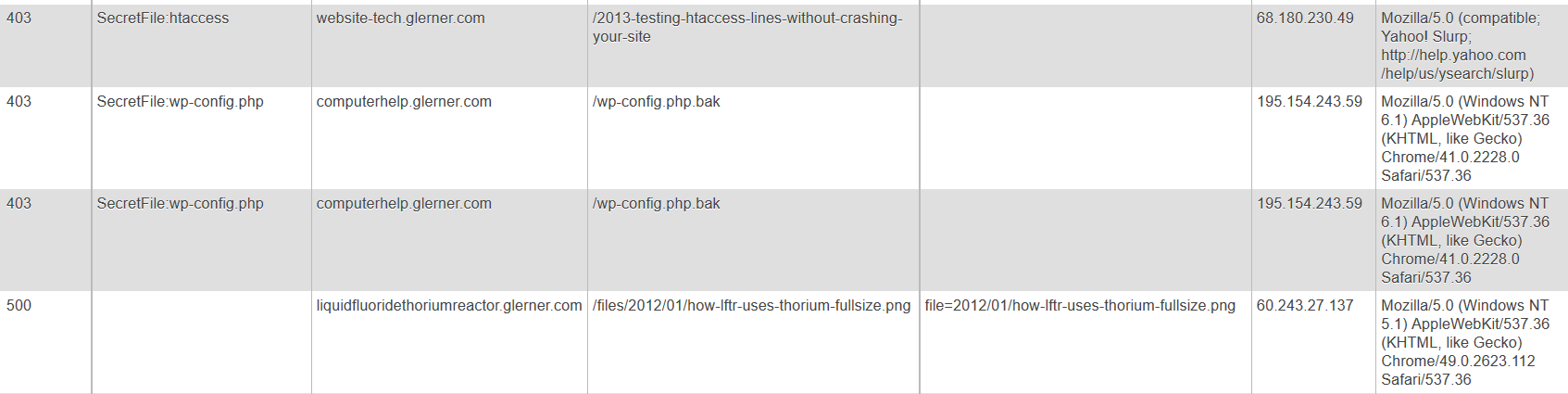
    403SecretFile:wp-config.phpcomputerhelp.lc.lndo.site/wp-config.php195.154.243.59Mozilla/5.0 (Windows NT 6.1) AppleWebKit/537.36 (KHTML, like Gecko) Chrome/41.0.2228.0 Safari/537.36Accept: */*
    403SecretFile:wp-config.phpcomputerhelp.lc.lndo.site/wp-config.php.bak195.154.243.59Mozilla/5.0 (Windows NT 6.1) AppleWebKit/537.36 (KHTML, like Gecko) Chrome/41.0.2228.0 Safari/537.36Accept: */*
    403SecretFile:htaccesswebsite-tech.lc.lndo.site/2013-testing-htaccess-lines-without-crashing-your-site68.180.230.49Mozilla/5.0 (compatible; Yahoo! Slurp; http://help.yahoo.com/help/us/ysearch/slurp)Accept: */* Accept-Encoding: gzip

    My error pages log the errors that are detected, into a database. This lets me easily search for errors, and also easily troubleshoot when a valid file triggers an error. These three examples were in my database coincidentally almost the same time, from someone (IP address 195.154.243.59) trying to get information about my site, and someone trying to read an article I wrote but my security system was blocking.

    How to Block Files

    This is in my .htaccess file:

    # prevent access to PHP error logs, other secret files
    # need to escape periods (or behaves as "any character"), don't need to escape underscores
    SetEnvIf Request_URI (?i).*(htaccess|php\.ini|wp-config\.php|wp-config\.bak|wp-configbak1\.php|debug_log|error_log|404\.log|ignore404\.log|error_log403|error_logbot|500\.log|readme\.html|readme\.txt) badSecretFile=$1
    
    # use syntax like this to enable any special case URLs, the exclamation point un-sets the environment variable
    SetEnvIf Request_URI (?i)(/2013-testing-htaccess-lines-without-crashing-your-site) !badSecretFile
    SetEnvIf Request_URI (?i)(/2013-xampp-limit-not-allowed-in-htaccess) !badSecretFile
    SetEnvIf Request_URI (?i)(/2013-error-reporting-from-htaccess) !badSecretFile
    SetEnvIf Request_URI (?i)(/2016-blocking-access-to-htaccess-wp-config-php-other-important-files) !badSecretFile
    SetEnvIf Request_URI (?i)(/files/2016/11/security-htaccess-wp-config.php-with-exceptions.*png) !badSecretFile
    SetEnvIf Request_URI (?i)(/tag/htaccess) !badSecretFile
    
    # deny doesn't transfer environment variables, except Deny from env= and should be inside a  or  to work
    RewriteCond %{ENV:badSecretFile} >"" [NC]
    RewriteRule (.*) - [F,L]
    

    Lines 1 and 2 are comments (start with a #)

    Line 3 uses a | to separate options. Set an Environment Variable if one of these things matches. Request_URI (the page being requested, so in http://www.yourdomain.com/abcdefg.html, the Request_URI is “abcdefg.html”) is checked for a match. Then (?i) says to ignore upper/lower case. Ignore anything before what we’re interested in, using .* (period for “any character”, asterisk for “zero or more times”). Then a list of file names to check for, e.g. htaccess or wp-config.php. Then we set an environment variable (badSecretFile) to $1 which is the first “something in parenthesis” that was matched. End result, badSecretFile gets set to “htaccess” or “wp-config.php” or “error_log”, etc.

    Line 5 through 11 “un-set” the environment variable badSecretFile for some of my pages. I’m writing about techniques on .htaccess, so I have to un-block my pages from the security rules saying nobody gets to read any file with “htaccess” in the name. (When writing security rules like this, be very specific, use the full name of your WordPress page.)

    Line 10 has something specific to WordPress. Images are often resized by WordPress to match the sizes your theme wants; the size is added in the file name. http://website-tech.lc.lndo.site/files/2016/11/security-htaccess-wp-config.php-with-exceptions-1080×425.png is the actual file name used in this case, so have to tell .htaccess to allow (with .* ) any extra characters in that location.

    Line 13 is a comment about the normal way of blocking access to files, using for example <Files> or similar statements. However, that method doesn’t allow exceptions (would block my articles on how to use .htaccess, for example) and doesn’t provide a way for error pages to report on what triggered the request getting blocked.

    Line 14 says that if the environment variable badSecretFile has been set, then the RewriteRule in line 15 gets executed. Line 15 says any file name (.*) gets redirected to – which is the shorthand for “nowhere”, and then the [F,L] says Fail (with a 403 status code, triggering your error page) and this is the Last thing to do (stop executing .htaccess now).

    How to Track .htaccess Errors

    This is a very long topic, so for now I’ll just say that PHP can read the environment variables that exist in .htaccess.

    Here is the snippet of PHP code I use for detecting this particular error, where I used badSecretFile to store what was blocked.

    if (!empty($_SERVER['REDIRECT_badSecretFile'])) {
    	$htaccessErrors[] = 'SecretFile:'.$_SERVER['REDIRECT_badSecretFile'];
    }
    

    PHP gets the environment values from the requested page in (for example) REDIRECT_badSecretFile, and the values for the error page do not have the “REDIRECT_” prefix. You also have to check for errors that get re-triggered by subdomains, and have REDIRECT_REDIRECT_ prefixes. All of the $_SERVER variables are available to PHP. For example if (!empty($_SERVER['REMOTE_HOST'])) { /* do something */ }

    Why Was My Page Blocked?

    Simple. I had been blocking page names with a trailing slash, and this person didn’t have the trailing slash in their request (http://website-tech.lc.lndo.site/2013-testing-htaccess-lines-without-crashing-your-site and I only enabled http://website-tech.lc.lndo.site/2013-testing-htaccess-lines-without-crashing-your-site/ )

    If I had not been logging my site errors, and checking my log, I probably wouldn’t have found this mistake.

    My logging to a database, including having the server tell me what made this be blocked (in this example, “SecretFile:htaccess”) had me see the error and be able to fix it.

    If I had not logged what triggered the error, even if my eyes had gone over the log entry, I would not have seen it; I would have thought it was blocked by User Agent (what type of browser was used), or by IP address, or “something”.

  • Adding a Second Login to WordPress

    Logging in to WordPress is at the application level. You can also have a server login before getting to WordPress. This 2-step login makes your site much more secure.

    Once you know how, adding this server login is actually quite easy to do.

    Unlike plugins that might change parts of WordPress itself, this doesn’t change anything about WordPress; this uses the server’s security, so only people you say are permitted to execute programs.

    The most important folder to protect is wp-admin/ since it has, obviously, all the administrative programs for WordPress. Or, you can protect the wp-login.php file.

    One essential step is generating an encrypted version of the password you want to use. Then you have to know where to install the encrypted password, and how to tell your server to require the password for the files you want to protect.

    See my .htpassword tool for instructions and an easy way to generate the encrypted password your server would use.

  • Security from Bad User Agents

    One way to protect your site is blocking bad “User Agents”.

    A user agent is the way your browser identifies itself to your server. Your server could use this to send different versions of your site to the browser; for example, not sending images to a Lynx browser that only displays text, or to a browser that is a screen reader for blind or low-vision people. My Firefox browser has this user agent:

    Mozilla/5.0 (Windows NT 6.1; WOW64; rv:27.0) Gecko/20100101 Firefox/27.0

    Search engines also make requests of your server and identify themselves with a user agent, as do hacker bots.

    The User Agent can be changed. Some browsers pretend to be a version of Internet Explorer. Some hacker bots pretend to be any major browser they like, switching for different requests. Some pretend to be Google’s search engine bot.

    Web site developers will use browser plugins to send a different user agent string, so they can test what their web site sends to people with other browsers. (I’m using the Firefox “User Agent Overrider” plugin to change my browser’s user agent; on my server I detect user agent, which lets me know the browser type and version, operating system, whether it is a mobile device, and more, using a PHP script from http://techpatterns.com/downloads/php_browser_detection.php which I think is much nicer than using javascript since I only send to the browser the best HTML/ CSS for it.

    So the User Agent isn’t a good field to check for security. There are other fields that bad bots can’t fake, for example bad words/phrases in the URL they are looking for on your site.

    But checking the user agent is good for blocking nuisances that waste your site resources.

    How Do You Block a User Agent

    Almost all shared hosting accounts are on Apache servers.  Microsoft IIS is much harder for most people to use, so I’ll give Apache .htaccess examples.

    The “Better WP Security” plugin for WordPress has a good-sized list of bad User Agents that it can add to your site’s list.

    Here’s some of their code for blocking user agents (all the other examples I’ve seen use the exact same approach):

    RewriteCond %{HTTP_USER_AGENT} ^EirGrabber [NC,OR]
    RewriteCond %{HTTP_USER_AGENT} ^EmailCollector [NC,OR]
    RewriteCond %{HTTP_USER_AGENT} ^EmailSiphon [NC,OR]
    RewriteCond %{HTTP_USER_AGENT} ^EmailWolf [NC,OR]

    The ^ means “at the start” of the User Agent, the [NC,OR] says not case sensitive and any one or the other will match.

    Here’s how I do the same thing, but allowing me to set exceptions to the security rule, and to log what specifically triggered the rule:

    SetEnvIfNoCase User-Agent (eirgrabber|emailcollector|emailsiphon|emailwolf) badUserAgent=$1

    For User-Agent values that have multiple values (the | separates them) and that contain special characters, you must use substitutions:
    \s for spaces, \. for period, @ : ! are permitted
    For this User-Agent: Bot mailto:craftbot@yahoo.com use this in your .htaccess: Bot\smailto:craftbot@yahoo\.com

    Then I send bad user agent requests to a page this way:

    RewriteCond %{REQUEST_URI} !/shared/bad-webbot.php$ [NC]
    RewriteCond %{REQUEST_URI} !/shared/403.php$ [NC]
    RewriteRule (.*) /shared/bad-webbot\.php [E=badUserAgent:%0,L]

    First I check that the file being requested isn’t one of  my “error” pages. The user agent doesn’t change when I redirect to an error page, so if I don’t make an exception for my error page, the server has a security conflict (you told me to display this page with that security rule, but the page violates the security rule) and gives up by showing a bare “500: Server Error”.  Then I redirect the requested file to my “you’re a nuisance” page.

    The E=badUserAgent:%0 sets an environment variable that my bad-webbot.php page can read.

    The ,L says this is the Last thing to check in .htaccess, go right to the page.

    My bad-webbot.php just displays minimal HTML, with no style sheet. But it also logs the IP address and what makes me think they’re a nuisance, in this case which phrase in their user agent triggered the security script. If something is being blocked incorrectly, I can see it in the log.

    One exception I found for user agents was for LinkedIn. “Jakarta” is one of the agents suggested for blocking, but LinkedIn uses this user agent. Another I made an exception for is Alexa.

    LinkedInBot/1.0 (compatible; Mozilla/5.0; Jakarta Commons-HttpClient/3.1 +http://www.linkedin.com)

    Here’s how I made the exceptions:

    SetEnvIfNoCase User-Agent ia_archiver\ \(+http://www\.alexa\.com\/site\/help\/webmasters;\ crawler@alexa\.com) !badUserAgent
    SetEnvIfNoCase User-Agent LinkedInBot/1\.0\ \(compatible;\ Mozilla/5\.0;\ Jakarta\ Commons-HttpClient/3\.1\ +http://www\.linkedin\.com) !badUserAgent

    Notice how I put a backslash before all spaces, periods and slashes inside the user agent string.

    The ! before the variable (badUserAgent) un-sets the environment variable.

  • Example of Error Reporting from Error 403:Permission Denied

    Here are some actual error messages I received, triggered by hackers or spammers. I’ve only edited them to not disclose my server secrets.

    Definitely read the main post Error Reporting from .htaccess.

    Here’s the error log entry:

    htaccess Errors = badRequestString:.asp--asp | 220.161.96.101 Accessing: lcblog.lernerconsult.com, /bokeindex.asp Tue Sep 3 2013 10:44:23 am MST 

    Here is the email subject:

    403 lcblog.lernerconsult.com /bokeindex.asp

    Right away, I know a hacker got blocked, I don’t need to read the email. Delete.

    Here’s what the email contains: What triggered the 403:Permission Denied error (the use of .asp), who tried to load what, info about them including what cookies they have and browser type. Then I can see the system PHP error log, so I know the status of my site; yeah I know I’m sending that via an insecure email. (The 403 Errors are logged in a different file, not cluttering my system error log.) Then the PHP system variables, $__SERVER and $_ENV (these I usually keep commented out of the emails, now that I’ve made sure I have the info I need, and if I’m tracking a big problem, it’s really nice to have).
    (more…)

  • Testing .htaccess Lines Without Crashing Your Site

    On Apache servers, you put many configuration settings in your .htaccess file.

    Syntax Errors in your .htaccess file will crash your entire site. If you have errors in your /public_html folder .htaccess, you will crash all sites set up as sub-domains or parked domains as well.

    This post is not a tutorial on modifying .htaccess files, but on how to test a complex command outside of your main site.

    There are many techniques for identifying which line is the one crashing your site. Your site error log may say a certain command is not allowed in your .htaccess (your hosting provider may have to make the setting change for you). Or you restore a version that you know worked, test it (make sure it still works), and add small chunks of the bad file: works to line 57, crashes by line 100, works to line 70, crashes by line 85, works to 75, crashes by 80, ah it’s line 77. (When narrowing down which chunks work, make sure you keep section tags matched, having unmatched .htaccess section tags will definitely crash your site.)

    Testing Syntax Outside Your Main Site

    Your site is functioning. You want to add something to .htaccess, without crashing the site.

    Before you do anything else, Back Up to a new folder on your computer (very deliberately Not to the folder you use every day for web site work!) your functioning .htaccess file. Then rename it in this special folder, with date and status, and make it a .txt file). Keep calm, keep sane, be clear. Have a working version you can fall back on. Keep your working version safe.

    Test the new command first, before adding it to your main site, someplace with no effect to normal site visitors.

    You could have a .htaccess file in any folder. The .htaccess from the root folder is read first, then any .htaccess files in sub-folders to get to the folder a web page is in. (Don’t replicate all the commands from the root .htaccess, and don’t make a .htaccess in each folder unless you need a change from the folders above, that just slows down your web site.)

    Make a new folder, a sub-folder of your main site. Any made-up valid folder name. Put a minimal HTML file in that folder. Here’s an example:


        Minimal HTML file


    This is a Minimal HTML file for Testing.

    Test that this page displays in your web browser.

    Now put a new, empty .htaccess file in this new folder. (The file name must start with a period, so it may be easiest to use your FTP program to create a new file on the server, and then use your FTP program to open it for editing; most Windows programs don’t understand file names starting with a period…)

    Put a comment (any line that starts with a # is a comment) in this .htaccess file, save it, make sure the test page still displays.

    Now you can begin actual testing of the line that was causing all the trouble.

    In the following example, start with a very simple statement, gradually add a piece at a time and make it work.

    Each line of the example below was how I tested a long User-Agent. Below is the final result, with the bad lines commented out.

    This one works:

    SetEnvIfNoCase User-Agent LinkedInBot itWorked

    This has a slight change, the parenthesis, and fails:

    SetEnvIfNoCase User-Agent LinkedInBot(compatible itFailed

    The failure is a 500 Server Error. (Ignore the itWorked or itFailed environment variables being set, that’s not what the failure is, the failure is an illegal use of a special character in the statement.)
    Change to this and it works again:

    SetEnvIfNoCase User-Agent LinkedInBot\(compatible itWorked

    The backslash converts the meaning of the opening parenthesis from special character to something to display. (Parentheses enclose partial results that can then be referred to, and the missing closing parenthesis makes the syntax invalid, 500 Error.)

    Then add a single line of code and test it (in order to test the bad lines below, you’ll have to remove the leading #… as a comment, of course it’s valid!)

    Notice the difference between each line and the one before it.

    Working Example: Testing for a User Agent

    Ignore the word wrapping of long lines, on this screen and in your text editor. Each command must be on a single line (i.e. the command ends when you press the Enter key). Don’t type line numbers, displayed here only to help you see what is a separate line.

    # actual user agent string:  LinkedInBot/1.0 (compatible; Mozilla/5.0; Jakarta Commons-HttpClient/3.1 +http://www.linkedin.com) 
    
    # .htaccess lines that start with # are comments. Comments can Only start at the beginning of a line.
    
    # If the User-Agent system variable contains the value "LinkedInBot" (not case sensitive), set an environment variable "itWorked":
    SetEnvIfNoCase User-Agent LinkedInBot itWorked
    
    # SetEnvIfNoCase User-Agent LinkedInBot(compatible itFailed
    SetEnvIfNoCase User-Agent LinkedInBot\ \(compatible itWorked
    # must escape an open parenthesis ( by preceding it with a back-slash \
    # must escape a space meant as part of the string (so it isn't separating parameters)
    
    SetEnvIfNoCase User-Agent LinkedInBot/1\ \(compatible itWorked
    # a forward slash / is okay
    
    # SetEnvIfNoCase User-Agent LinkedInBot/1.0\ \(compatible itFailed
    SetEnvIfNoCase User-Agent LinkedInBot/1\.0\ \(compatible itWorked
    # must escape a period .
    
    SetEnvIfNoCase User-Agent LinkedInBot/1\.0\ \(compatible;\ Mozilla/5 itWorked
    # semicolon ; is okay
    SetEnvIfNoCase User-Agent LinkedInBot/1\.0\ \(compatible;\ Mozilla/5\.0; itWorked
    SetEnvIfNoCase User-Agent LinkedInBot/1\.0\ \(compatible;\ Mozilla/5\.0;\ Jakarta\ Commons itWorked
    SetEnvIfNoCase User-Agent LinkedInBot/1\.0\ \(compatible;\ Mozilla/5\.0;\ Jakarta\ Commons- itWorked
    # hyphen - is okay (test if it works when could be part of a character range e.g. a-f)
    
    SetEnvIfNoCase User-Agent LinkedInBot/1\.0\ \(compatible;\ Mozilla/5\.0;\ Jakarta\ Commons-HttpClient/3\.1  itWorked
    SetEnvIfNoCase User-Agent LinkedInBot/1\.0\ \(compatible;\ Mozilla/5\.0;\ Jakarta\ Commons-HttpClient/3\.1\ +http  itWorked
    # plus + is okay
    
    SetEnvIfNoCase User-Agent LinkedInBot/1\.0\ \(compatible;\ Mozilla/5\.0;\ Jakarta\ Commons-HttpClient/3\.1\ +http://www  itWorked
    # colon slashes :// are okay
    
    SetEnvIfNoCase User-Agent LinkedInBot/1\.0\ \(compatible;\ Mozilla/5\.0;\ Jakarta\ Commons-HttpClient/3\.1\ +http://www\.linkedin\.com  itWorked
    SetEnvIfNoCase User-Agent LinkedInBot/1\.0\ \(compatible;\ Mozilla/5\.0;\ Jakarta\ Commons-HttpClient/3\.1\ +http://www\.linkedin\.com)  itWorked
    # closing parenthesis (at least when isn't an open parenthesis it could match) is okay
    
  • Server alert you of File Not Found and other Errors

    I want to know when there are errors on my site.

    “404: File Not Found” errors can be from forgetting to upload an image, or from typing a URL wrong for a link to another page on my site. They can also be from people typing a file name wrong (some words are commonly mis-spelled). I can correct all of these, if I know about them.

    Most people have to remember to check their site logs. (But they don’t.) I want the option of having the server send me an email.

    Yes, I get emails about made-up names search engines look for, and made-up names spammers search for. I just delete these emails, part of web site maintenance (or I turn off emails about errors that didn’t start from my site, e.g. hackers searching). A few search bots are so bad, I have my site not send me emails about their “missing files”; the Bing-bot is drunk.

    I also want to know about some categories of 403: Access Denied requests, to make sure that none are for files that should be permitted. I’ve had some WordPress plugins, for example, that produced file names with double slashes in them, which my security system was blocking; I needed to know that was going on, and what exactly was making those legitimate file requests get blocked. I needed full disclosure from my server.

    Here is how I have the server give me the reports I need. (Another post will cover the security system I use, and the modifications to get the full disclosure from it.)

    What you Need to Use This

    I’m writing to experienced PHP programmers. You have to be able to understand, install, test PHP programs. This works on my server, LunarPages hosting and an IIS server, but accesses server variables that might be different on your server; there is no way I can know the details of your server (unless you hire me to install this for you). This might not fully work on your server, or might need modification! If you can’t debug PHP, for server-level functions, don’t try this; have me or another programmer do this for you.

    This works best on Apache web servers. This also works on IIS servers, though they will probably give less detailed reporting, and may block writing the error log entries. (I’m not going to give IIS instructions here, if you have an IIS server you probably already know how to adapt these instructions. In another post I’ll show my web.config file changes for IIS.)

    How to Call This

    I have my server error pages, 403.php 404.php 500.php (specified in .htaccess) include errortowebmaster.php. I have all these files in /public_html/shared (and have symbolic links defined so the shared folder literally does get shared by all my web sites).

    Initializing errortowebmaster.php


    So far, I am doing some standard initializing variables.

    LinkChecker is a good free program to check for broken links on your site; I want to not get an email for each link it finds, since it produces good reports itself. I simplify the http agent field (and have these defined in one place should the agent ever change).

    What Caused 403:Access Denied Errors?

    I am using the 5G Blacklist/Firewall from http://perishablepress.com/5g-blacklist-2013/ to block access by hackers and spammers. It works on commonly used patterns in several server fields, not on constantly-updated IP addresses or constantly-spoofed User Agent fields. I highly recommend reading their pages, so you understand how it works.

    However, the 5G Blacklist needs testing, to make sure nothing on your server gets blocked inadvertently. Another post will show how I customized the 5G Blacklist script; this post shows how I use server variables I set, to give me reports — what phrase triggered what section of the Blacklist.

    if ( (getenv("REDIRECT_noRewrite") !== FALSE) || (getenv("noRewrite") !== FALSE) ){
    	$htaccessErrors[] = 'Module mod_rewrite.c not installed or not enabled';
    }
    if (getenv("REDIRECT_dotHTLocation") !== FALSE) {
    	/* for testing only, which .htaccess file is being triggered? The root or a subdomain? Testing showed that on LunarPages hosting, only the QueryString section of 5G Blacklist needs to be in a subdomain's .htaccess file -- easier to maintain updates with most of the 5G Blacklist in only one place */
    	$htaccessErrors[] = '.htaccess location:' . getenv("REDIRECT_dotHTLocation");
    } elseif (getenv("dotHTLocation") !== FALSE) {
    	$htaccessErrors[] = '.htaccess location:' . getenv("dotHTLocation");
    }
    
    if (isset($_SERVER['REDIRECT_noUserAgent']) || isset($_SERVER['noUserAgent']) ) {
    	$htaccessErrors[] = 'NoUserAgent';
    }
    
    /* root .htacess sets variable, subdomain .htaccess sets REDIRECT_variable, since the root checks first then redirects to the subdomain */
    
    /* variable names must exactly match what shows up in $_SERVER, is case sensitive (e.g. badQueryString not BadQueryString) */
    if (getenv("REDIRECT_badQueryString") !== FALSE) {
    	$htaccessErrors[] = 'badQueryString:'.getenv("REDIRECT_badQueryString");
    	$sendMail = $sendMail ? $emailQueryString : false;
    } elseif (getenv("REDIRECT_REDIRECT_badQueryString") !== FALSE) {
    	$htaccessErrors[] = 'badQueryString:'.getenv("REDIRECT_REDIRECT_badQueryString");
    	$sendMail = $sendMail ? $emailQueryString : false;
    } elseif ($querystring=='QUERY_STRING') {	/* from IIS web.config */
    	$htaccessErrors[] = 'badQueryString';
    	$sendMail = $sendMail ? $emailQueryString : false;
    }
    
    if (getenv("REDIRECT_badRequestString") !== FALSE) {
    	$htaccessErrors[] = 'badRequestString:' . getenv("REDIRECT_badRequestString");
    	$sendMail = $sendMail ? $emailRequestString : false;
    } elseif (getenv("REDIRECT_REDIRECT_badRequestString") !== FALSE) {
    	$htaccessErrors[] = 'badRequestString:' . getenv("REDIRECT_REDIRECT_badRequestString");
    	$sendMail = $sendMail ? $emailRequestString : false;
    } elseif ($querystring=='URL_REQUEST_STRING') {	/* from IIS web.config */
    	$htaccessErrors[] = 'badRequestString';
    	$sendMail = $sendMail ? $emailRequestString : false;
    }
    
    if (getenv("REDIRECT_badUserAgent") !== FALSE) {
    	$htaccessErrors[] = 'badUserAgent:' . getenv("REDIRECT_badUserAgent");
    	$sendMail = $sendMail ? $emailUserAgent : false;
    } elseif (getenv("REDIRECT_REDIRECT_badUserAgent") !== FALSE) {
    	$htaccessErrors[] = 'badUserAgent:' . getenv("REDIRECT_REDIRECT_badUserAgent");
    	$sendMail = $sendMail ? $emailUserAgent : false;
    } elseif ($querystring=='USER_AGENT') {	/* from IIS web.config */
    	$htaccessErrors[] = 'badUserAgent';
    	$sendMail = $sendMail ? $emailUserAgent : false;
    }
    
    if ( getenv("REDIRECT_badRequestMethod") !== FALSE ) {
    	$htaccessErrors[] = 'badRequestMethod:' . getenv("REDIRECT_badRequestMethod");
    	$sendMail = $sendMail ? $emailRequestMethod : false;
    } elseif ( getenv("REDIRECT_REDIRECT_badRequestMethod") !== FALSE ) {
    	$htaccessErrors[] = 'badRequestMethod:' . getenv("REDIRECT_REDIRECT_badRequestMethod");
    	$sendMail = $sendMail ? $emailRequestMethod : false;
    }
    
    if ( (getenv("REDIRECT_badCharsInRequest") !== FALSE) || (getenv("REDIRECT_REDIRECT_badCharsInRequest") !== FALSE) ) {
    	$htaccessErrors[] = 'badCharsInRequest (e.g. CRLF)';
    	$sendMail = $sendMail ? $emailBadChars : false;
    }
    /* testing, don't know yet which .htaccess catches badCharsInRequest problems */
    if ( (getenv("REDIRECT_badCharsInRequestLC") !== FALSE) || (getenv("REDIRECT_REDIRECT_badCharsInRequestLC") !== FALSE) ) {
    	$htaccessErrors[] = 'badCharsInRequestLC (e.g. CRLF)';
    	$sendMail = $sendMail ? $emailBadChars : false;
    }
    
    if ( (getenv("REDIRECT_badCookie") !== FALSE) || (getenv("REDIRECT_REDIRECT_badCookie") !== FALSE) ) {
    	$htaccessErrors[] = 'badCookie';
    	$sendMail = $sendMail ? $emailCookie : false;
    }
    /* testing, don't know yet which .htaccess catches cookie problems */
    if ( (getenv("REDIRECT_badCookieLC") !== FALSE) || (getenv("REDIRECT_REDIRECT_badCookieLC") !== FALSE) ) {
    	$htaccessErrors[] = 'badCookieLC';
    	$sendMail = $sendMail ? $emailCookie : false;
    }
    
    if (isset($_SERVER['REDIRECT_ERROR_NOTES'])) {
    	$htaccessErrors[] = 'Error Notes:'.$_SERVER['REDIRECT_ERROR_NOTES'];
    } elseif (isset($_SERVER['REDIRECT_REDIRECT_ERROR_NOTES'])) {
    	$htaccessErrors[] = 'Error Notes:'.$_SERVER['REDIRECT_REDIRECT_ERROR_NOTES'];
    }
    
    /* badNuisance should be sent directly to bad-webbot.php, display minimal page. Nuisance in QUERY_STRING would arrive here */
    if (isset($_SERVER['REDIRECT_badNuisance'])) {
    	$htaccessErrors[] = 'Nuisance:'.$_SERVER['REDIRECT_badNuisance'];
    	$sendMail = false;
    } elseif ($querystring=='NUISANCE') {
    	/* from IIS web.config */
    	$htaccessErrors[] = 'Nuisance';
    	$sendMail = false;
    } 
    
    if (isset($_SERVER['REDIRECT_badBot']) || isset($_SERVER['REDIRECT_badBadHacker']) ) {
    	/* badBot set in /shared/blackhole/.htaccess, for the George Lerner modified version of http://perishablepress.com/blackhole-bad-bots/ which makes lines to cut/paste into .htaccess */
    	if (isset($_SERVER['REDIRECT_badBot']) ) {
    		$htaccessErrors[] = 'badBot '. $_SERVER['REDIRECT_badBot'];
    		$sendMail = $sendMail ? $emailBot : false;
    	}
    	/* If an IP address gives too many 403 errors, add them to the badBadHacker list in .htaccess. Future enhancement, have this file keep count, make a log file with lines to cut/paste into .htaccess */
    	if (isset($_SERVER['REDIRECT_badBadHacker']) ) {
    		$htaccessErrors[] = 'blacklisted by IP';
    		$sendMail = $sendMail ? $emailHacker : false;
    	}
    } elseif ($querystring=='IP_ADDRESS') {
    	/* from IIS web.config */
    	$htaccessErrors[] = 'blacklisted by IP';
    	$sendMail = $sendMail ? $emailHacker : false;
    }


    On my server, custom server variables get prefixed with 'REDIRECT_' and I tested both with and without the prefix; this is definitely something that your server could do differently. Check the $_SERVER and $_ENV variables for the actual variable names on your server.

    Very Detailed Error Display for My Computer

    Put your IP addresses (e.g. home computer, work computer, and smart phone) in $myipaddress, set in your secret configuration file (secret because it contains your IP address, which will let baddies see your server configuration). Not "secure" but probably "secure enough"; someone who sees your screen can get anything they want from you; someone who has access to your configuration file has full access to your site. Sometimes is Very useful for debugging to see the server variables, especially when I am configuring a new client's account. Just browse to any non-existent file name on their web site from my computer, and my 404.php shows me (and only me) $_SERVER and $_ENV.

    For any IP address I know, I also display my name for it. For example, don't put the local coffee shop in the "My IP" list, but it makes sense to identify the coffee shop so you know "that was me testing things" or "hmm, I was at the coffee shop, but didn't access That file..." (Pay attention to who can see your screen, even from a distance!) I also put names to the IP address of web site clients, since they will have a lot more errors as they develop new pages on their site, (those few times I notice an ongoing problem and give them the solution, they love it).

    Displaying the Detailed Troubleshooting & Error Information

    Note: For getting this to display well in WordPress, I changed <pre> to <code> (open and close tags) in the next section. You'll probably like the display better if you use pre in your code.

    if (in_array($ip, $myipaddress)) {
    	echo "
    .htaccess Errors:
    "; print_r($htaccessErrors); echo "
    "; echo "
    _SERVER:
    "; print_r($_SERVER); echo "

    _ENV:
    "; print_r($_ENV); echo "

    "; if (isset($_GET)) { foreach ($_GET as $arg) { $clean = filter_input(INPUT_GET, $arg, FILTER_SANITIZE_STRING); // new PHP function print "Get Parameter: $clean
    "; } } if (isset($argv)) { // IIS (Cart32) leaves in $_SERVER['QUERY_STRING'], or $_SERVER['argv'], both unparsed, on error pages. foreach ($argv as $arg) { $clean = filter_input(INPUT_GET, $arg, FILTER_SANITIZE_STRING); print "Argv Parameter: $clean
    "; } } else if (isset($_SERVER['argv'])) { foreach ($_SERVER['argv'] as $arg) { $clean = filter_input(INPUT_GET, $arg, FILTER_SANITIZE_STRING); print "_SERVER argv Parameter: $clean
    "; } } } $ipText = $ip; switch ($ip) { case "12.345.67.89" : case "123.45.678.90" : $ipText .= " (My Home)"; break; case "98.76.54.32" : $ipText .= " (My Work)"; break; default: // $ipText .= " (unknown)"; } $combine = $ipText . " tried to load \n";

    Writing an Error Log

    After some checking for uninitialized variables, write a brief error result to log files. I deliberately keep 403 errors out of the system PHP error log, as they require different attention. (Tempting to move 404 errors to their own file, so many idiot search engines/bots, but then I wouldn't see when I forgot to upload an image... I do, however, note when a request originated from a file on my server, since this is much more likely something I need to fix.)

    if (strpos($requri, $servname) !== false) {
    	/* MVC's IIS server gives full URL and status in requri */
    	if ($status !== '') {
    		$subject = $status.' '.$requri; 
    	} else {
    		$subject = $requri;
    	}
    	$combine .= " $requri";
    } else {
    	$subject = "$status $servname $requri";
    	$combine .= " $servname$requri"; 
    }
    
    $mycookie = "";
    foreach ($_COOKIE as $cookie_name => $cookie_text)
    {
    	$mycookie .= "\t" . $cookie_name . ": " . $cookie_text . " \n";
    }
    
    if (!isset($browser_name)) { $browser_name = "(unknown) "; }	
    // set by script from http://techpatterns.com/downloads/php_browser_detection.php
    if (!isset($browser_ver)) { $browser_ver = "(unknown) "; }
    

    Display Info On Web Browser

    $message = "

    $note

    \n

    $combine

    \n

    Remote Host = $remoteHost

    \n

    Query string = $querystring

    \n

    HTTP Referer = $httpref

    User Agent = $httpagent

    \n

    $today

    \n

    Cookies =

    $mycookie
    \n
    "; $message .= "\nBrowser detected as: " . $browser_name . "version " . $browser_ver; $message .= "\nIP Address: " . $ip; echo $message;

    Sending an Email to Site Administrator

    The email will be sent to the address in $adminemail, defined in your secret configuration file.

    function implode_r($glue,$arr){
            $ret_str = "";
            foreach($arr as $a){
                if ($ret_str === "") {
    				$ret_str .= (is_array($a)) ? implode_r($glue,$a) : $a;
    			} else {
    				$ret_str .= (is_array($a)) ? implode_r($glue,$a) : $glue . $a;
    			}
            }
            return $ret_str;
    }
    if (!isset($logfile)) { 
    	$logfile = getenv("DOCUMENT_ROOT") . "/error_log";
    }	
    if (!isset($deniedLogfile)) { 
    	$deniedLogfile = $logfile.'403';
    }
    if (!file_exists($logfile)) {
    	$fh = @fopen($logfile, 'w'); 
    	if ($fh !== FALSE) { fwrite($fh, "ErrorToWebMaster New Error File\n"); fclose($fh); }
    }
    if (!file_exists($deniedLogfile)) {
    	/* some servers prohibit fopen, so @ before it to prevent error messages */
    	$fh = @fopen($deniedLogfile, 'w'); 
    	if ($fh !== FALSE) { fwrite($fh, "ErrorToWebMaster New 403 Error File\n"); fclose($fh); }
    }
    if (isset($htaccessErrors)) {
    	$htaccessErrorsStr = implode_r(" | ",$htaccessErrors);
    	/* Cart32 wimpy IIS hosting doesn't allow error_log ("permission denied") so @ before it */
    	@error_log("htaccess Errors = $htaccessErrorsStr | $ipText Accessing: $servname, $requri $now \n",3,$deniedLogfile);
    } else {
    	@error_log("$ipText Accessing: $servname, $requri $now \n",3,$logfile);
    	$htaccessErrorsStr = '';
    }
    
    /* $message was for on screen, $message2 is for emailing */
    $message2 = "htaccess Errors = $htaccessErrorsStr\n
    $combine \n
    Remote Host = $remoteHost\n
    Query string = $querystring \n
    HTTP Referer = $httpref\n
    User Agent = $httpagent \n
    $today \n
    Cookies = \n$mycookie \n";
    
    $message2 .= "\nBrowser detected as: " . $browser_name . "version " . $browser_ver;
    
    $fh = @fopen($logfile, 'r');
    if (filesize($logfile) == 0) {
    	$theData = "";
    } else {
    	$theData = fread($fh, filesize($logfile));
    }
    fclose($fh);
    $message2 .= "\n\n[Error Log]: $logfile\n" . $theData;
    $message2 .= "\n[End of Error Log]\n";
    $message2 .= print_r($_SERVER,true);
    $message2 .= print_r($_ENV,true);
    
    $to = $adminemail;
    $from = "From: " . $adminemail . "\r\n";
    
    if (isset($_SERVER['REDIRECT_ERROR_NOTES']) ) {
    	$sendMail = false;
    } else $sendMail = true;
    
    if ( (stristr($docroot,"xampp") == FALSE) && ($requri != "/wp-login.php") && ($httpagent != 'LinkChecker/') && ($httpagent != 'LinksManager.com_bot') ) {
    	if ($sendMail !== false) {
    		mail($to, $subject, $message2, $from);
    	}
    }
    ?>
    

    Questions?

    Post your comments or questions here, and of course if you would rather I set this up for you and get it working on your web site, let me know. Contact Me.