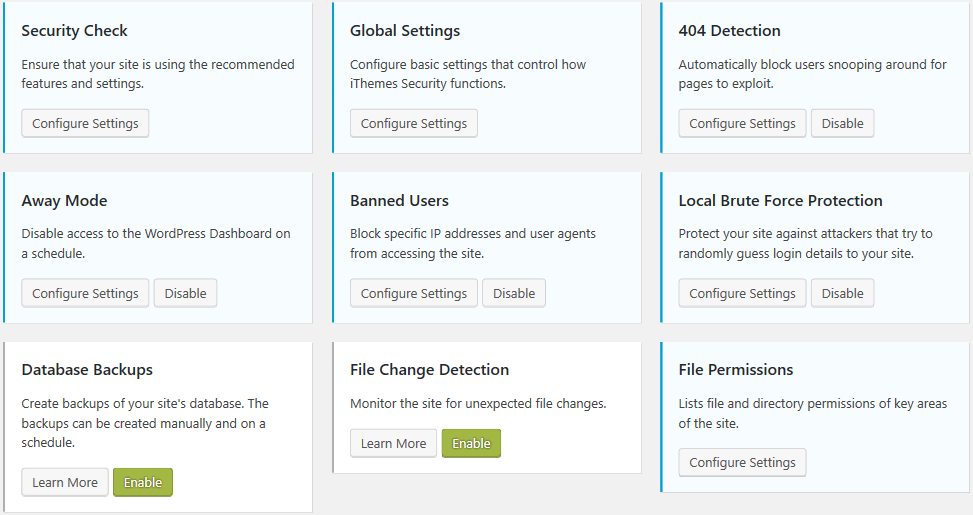
There are so many options in iThemes Security, it can seem bewildering, or too complex. But you can learn how to configure each section of iThemes Security, for what works best for your site. Here are the settings I use, and the things to look at for how to decide which settings you want.
Tag: hackers
-

Configuring iThemes Security for Your Shared-Hosting Site
iThemes Security is one of the most popular security plugins for WordPress. It truly covers a lot of essential steps for making your site run well, and keeping your site, and your information, safe from hackers. iThemes Security is excellent for you to get about as much security as you can do for yourself without studying hard. -

WordPress Ongoing Maintenance and Security
Having web sites run smoothly and safe from hackers, is important to me. It probably is important to you too, if you think about it a little. If you heard of any web site getting hacked, you know that could ruin your business day quickly.
When you find out your site has been hacked, or your site stopped working so you can’t generate sales, you know you’re not going to be having a good day.
After all, it’s easier to prevent problems like these, than to fix them…
You have been told, already, you need to keep your software updated… You need to do regular backups… You know you should be blocking hackers, even if you don’t know how… Are you hoping you can last a little longer, letting maintenance slide?
Preventing hackers from abusing your site is one very important part of running your web site, yet so many people and businesses just don’t have the time to do all the steps it takes. Even if you know how, or learn how, it’s not a good use of your time. You have better things to do!
We all know your web site working, the way it should, helps to keep your reputation good. It also increases sales, right?
Maintenance, done frequently, is important for your site.
Latest updates to your WordPress software (and all other software) does several things, including fixing bugs that keep your site operating well, adding new features, and also fixing any security problems that have been discovered.
Hackers know all those security problems. They study every security problem found world-wide, for how to take advantage of them.
Updates Without Problems
If an update does make a problem on your site, I know how to identify the problem very quickly, and get your site working again.
However, I also prevent problems by testing plugin updates on a testing site, before doing the update on your site.
I can replicate your site setup, plugins, theme, and content, on a testing site that is not accessible from the Internet. I will check the updates don’t introduce errors, whether with PHP or the WordPress database or other plugins.
How Do You Get Your Site Secure From Hackers?
Whether hackers want to post ads for their junk, or add links to steal traffic from you, or install malware to get your private information, or use your website hosting account to hack other sites, I hate hackers!
Most businesses don’t have anyone who knows how to do maintenance and security checks properly. It’s complex. It takes time to learn, time to check everything each month. Most people could learn to do it themselves, if they were interested and had the time; but it’s just not your most fun and exciting thing to do. It’s not what you would best be spending your time on.
(If that does sound good to you, contact me, I need more people helping have web sites run smoothly and be safe from hackers…)
There are WordPress plugins that take care of many security steps. These have to be configured, and tested (some website hosting companies have non-standard server configurations, so not all security options will work on all hosting). [Note: If you’re on a Microsoft IIS server, which can’t use the most common WordPress security plugins, I feel for you, and I can help some…]
You have to host your WordPress site on a company that has very strong security. Most of the best-known hosting companies are negligent about security; they don’t even keep the server software current; they don’t know WordPress security and troubleshooting; and they are not actively looking for ways to improve security. The best hosting companies have staff researching global security discussion boards for the latest hacker vulnerabilities, and put specific security rules in dedicated hardware installed between the Internet and the servers they host your site on.
Another important security step is using passwords for every login that are difficult for hackers to guess. And the way we’ve been taught to make “secure” passwords, for example substituting punctuation for vowels or adding a digit and punctuation mark at the end, are known by hackers too — and now those passwords are easily and quickly guessed. Long computer-generated passwords are highly secure, but impossible for people to remember and difficult to type. I can teach you how to make secure passwords both easy to remember and easy to type.
What I Provide
Whether you want to learn to do it yourself, or you want me to take care of your maintenance and site security, here is what I provide:
- Set up your WordPress site so it runs well. This includes removing plugins you don’t use, or that are security risks, or haven’t been updated in ages; adding plugins that are essential to the your site running properly; setting up site security so the most common attacks are blocked
- Keep your site security updated so it is much harder to hack (so you keep out most hackers, but I can’t stop government-level hacking groups).
- Keep current and past backups so your site can be recovered if something goes wrong. You always need a good backup!
- If you have more than one site, or know you want more sites, I can set up WordPress Multi-Site for you, easier for most companies than working with many single-site installations of WordPress.
- Select good plugins and themes. I find well written plugins and themes, that work well, don’t slow your site down, and are unlikely to have security vulnerabilities that hackers could exploit. Tip: with the WordPress block editor, you most likely can use the default TwentyTwenty theme, or a child theme that simply specifies your colors.
- Migrate your site to an excellent hosting company, if you think you might already be hacked, or if you don’t know your host has excellent security and technical support. A few hosting companies charge comparable amounts per year of hosting, but provide much better quality service and much better protection against hackers, than the normal hosting company. You almost certainly can’t find better hosting on your own, than the Arizona WordPress Meetup has found.
- Work with your hosting company technical support, to resolve any issues, so you won’t have to. (You’ll be able to use them or me for technical support.)
- Improve your marketing, including install and configure software for telling Facebook, Twitter, LinkedIn, Pinterest and other social media sites what you want them to display (text and image) when someone references a page on your site.
- Find what would speed up your site, which your visitors will love and so will search engines.
Contact me about your site maintenance and security and what you want, and we’ll know if we’re a good match.
Improve Your WordPress Site
Consistent monthly amount, low $20 setup charge.
Most basic sites, the kinds most small businesses need, I charge only $80/month, whether everything is working (that’s my job) or I have to put in many hours fixing something. This includes the first month, when I have to setup or reconfigure and check everything.
For enhancing your website, we’ll talk about what you need and I’ll let you know if I can include it in your monthly maintenance, or if it will cost extra; we’ll agree before I make the enhancements.
No contract, and I ask you set up minimum 6 months auto-pay so you don’t have to remember. Cancel any time, simply don’t pay for the next month and please let me know; but I don’t give refunds, since each month I will keep your site working.
-
Why Should You Not Host WordPress on IIS
When I mention I have clients with WordPress on IIS7 at the local WordPress Meetup (definitely go, well worth it), I invariably get snickers and disparaging comments. Some of that, especially from the less technical people, is just “Apache/MySQL/WordPress are Open Source”, and “big bad Microsoft is not as good”; it’s like cheering for your home sports team.
But the more technical people who have hosted WordPress for many clients, give different quality of answers.
I have a client hosting about 300 sites for Realtors. They brought me in to install WordPress in Multi-Site mode, for them to switch from their old ASP system to WordPress, and to then help them keep it running smoothly. Their IIS7 administrator was good at IIS but didn’t know WordPress or PHP, certainly not at the diagnostic and troubleshooting level.
Here’s the actual problems I have run into, over a few years of being their WordPress troubleshooter.
Linux and Apache vs. Windows and IIS
Linux (by far the most common operating system for web site hosting computers) and Apache (by far the most common web site hosting software, comes with Linux) and MySQL (the database that comes with Linux) are supported widely on web sites. You ask your search engine about an error message you get, or the tool you want, or the problem you’re having, and 15 of the top 17 sites listed will have the correct answer.
On IIS, those answers aren’t listed on hundreds of web pages. You’re not supposed to need them. You’re supposed to have taken the expensive Microsoft certification classes, have the manuals on paper and DVD, have the official troubleshooting tools and know how to use them. If you’re still stuck, you contact your Microsoft troubleshooter that you’ve paid for.
As a hosting client, you will either need to call your technical support to make the change to your IIS configuration, or you will hunt for months for a solution you can apply yourself. For something that, on Apache, you can fix yourself with a little learning in a few minutes from free resources.
Getting Help On Apache is Much Easier
WordPress Security on IIS vs Apache
I’m sure there are IIS security experts. IIS is used mainly on corporate web sites; they require experts on their security.
WordPress isn’t often hosted on IIS. WordPress has security issues that you aren’t going to see on web sites that are done by the one company, using only Microsoft tools for development.
Most web sites hosted on IIS have to deal with security holes in the operating system (whether Windows or Linux), on the web server (whether IIS or Apache), on the database (whether MSSQL or MySQL), and on the vulnerabilities in the development tools (e.g. the file uploader or the JavaScript form checking). But the site itself is written in house.
WordPress sites are developed using themes and plugins, mostly available open source for free. These plugins and themes are written by programmers who have unknown attention on security; every vulnerability in every plugin and theme offered on the WordPress repository, and every other well-known plugin or theme store, is known by hackers.
IIS security people are not used to thinking about security holes where every site owner can be installing plugins and themes that could unwittingly contain malware or insecure code.
One of the most common routes for hackers to install malware on your WordPress site, is to access a plugin that has file uploading, for example to upload images to a scrolling image slider. But instead of uploading an image, they upload a PHP program, or they upload it with a file extension saying it is (should be) an image and then rename it to a PHP program. The hackers know the folder their new file will be stored in; they can execute it any time.
There is a simple block for this — disallow execution of any PHP files, and since this is an IIS 7 server, any ASP files or C# files, in the wp-content/uploads folder. Really easy to implement, at the server level for all installations of WordPress on the server, once.
An IIS security person who knows he is “good at security” emailed me he’s not going to do that, “We need not invest any time going after problems that don’t threaten us. For instance, while the server supports ASP, there may currently be no ASP scripts on it, but there might sometime be, and blocking calls to scripts that don’t even exists serves no other purpose except to possibly cause excessive troubleshooting in the future when someone tries to put an ASP script on the server. Such a change would have zero positive effects, and potentially create negative consequences.” Do you notice that he isn’t thinking of hackers uploading a file? Even though the hack he just got hit by, uploaded .php files but could have uploaded .asp files. He still hasn’t blocked execution of PHP files in the wp-content/uploads folder!
IIS Administrators “know security” and have trouble adjusting their thinking to WordPress open-source plugin and theme attacks.
-
Security for Hosting Accounts, for WordPress Sites
There are many things you can do to make WordPress itself more secure, and I’ll cover those in another post.
The first level of security for WordPress should be your hosting account, done at the server. But with almost all hosting providers, you have to install security; good security almost never comes with the hosting account — most hosting providers don’t know security, they know how to provide an account that matches everyone’s basic needs.
There are major hosting companies that literally think they have good security because they have an armed guard outside their server room. Companies like these tend to have outdated server software; haven’t installed dedicated security software and dedicated someone to monitoring international security discussion groups for issues, haven’t done anything to counter these new issues.
A few companies, such as Sucuri can help you identify if your site is compromised, and clean up the malware. You still should have good security in place, to prevent as many attacks as possible.
You will likely have to make some exceptions to any security system, to allow requests for some of your pages. For example, ‘administrator’ is a common word targeted by hackers (for example, trying to get into database administrator tools), but also is legitimate for several non-computer web site topics.
You can block bad people from accessing your site through bad characters or phrases in several places in the URL, (including some you might not expect); or through bad cookies, that you might not even see.
You could detect them by the User Agent they use (though the smarter ones pretend they use a normal browser, many use the User Agent to brag about who they are).
You could try to block them by their IP address, but hackers know how to constantly change their IP address, so this is a wasteful approach. You would have to constantly be updating your ‘banned IP’ list, and having your server check through the huge list for every request, just slows down your entire web site.
Security experts have identified some very common methods of attacks, and nuisances that waste your server resources — and come up with very effective ways to block them.
I added having my server keep a log of what pages where blocked And Why (what phrase or trick was thwarted by my security systems, and what part of the security script caught their foul deed) — so if the security is blocking requests for a real page on your site, you can easily make an exception to the rule, leaving the protection in place for all other pages on your sites.
This is a big deal. When an important part of your site is blocked, you might not even know about it. Then you want to fix it quickly, not having to somehow guess right (literally, in the past I had to try removing large pieces of a security system, to hope one of the pieces was to blame, not a combination of security rules). Trying to fix a problem ‘blind’, in a very detailed technical part of your web site, under pressure, is No Fun.
I’ll be writing how to stop each type of bad trick hackers play, so you understand how it works; and if you know .htaccess fairly well you can implement the security and reporting yourself.
If you don’t know .htaccess well, or just want me to take care of it for you, contact me and I can probably set it up for you.
You don’t have to leave security for your WordPress sites up to luck. Stop those bad people before they damage your site.