Remember, everyone, the “Reply To:” field is Easily faked.
Looking at that is Not a way to check whether an email is legitimate.
Your email reader software (whether a website or an app on your phone or an app on your computer)
should indicate whether an email passes some validation (e.g. DMARC, DKIM, SPF) or not.
Do not click on links in an email.
The “link text” can show anything, different than the link address
Verify the link address has no “tricky characters” in it.
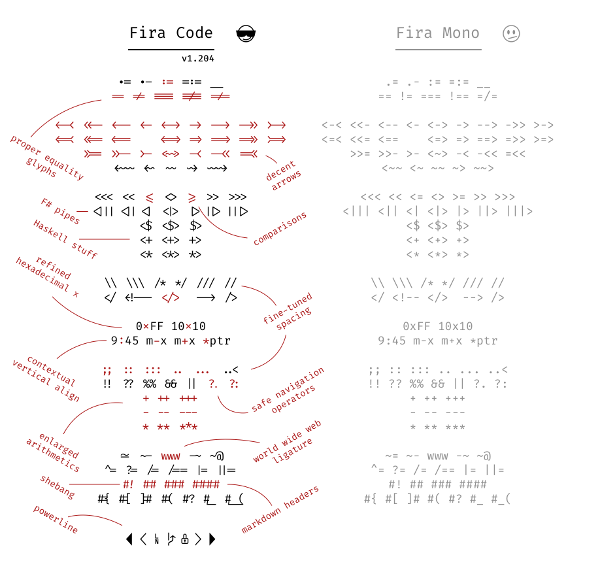
Copy the link address to your clipboard, paste it into a text editor (preferably with a mono-spaced font like Fira Code) and verify it.
Or, browse to your “known important site” your normal way (e.g. your bank) and read the message directly on the Real site.
p.s. Fira Code is on Google Fonts https://fonts.google.com/specimen/Fira+Code , free to install on your computer, easy to set your programming editor and spreadsheet to use it. It was designed so all the “look similar” characters, such as a one and an el and an eye, are easily distinguished.
Inside WordPress, of course use the Block Editor (or the editor in your page builder, if you use one).
But you will probably have many uses for a text editor on your computer, as you are writing your WordPress pages, and throughout your day.
I often write my ideas for a post, in a text editor, to get a good idea what I’m going to say.
Many of the text files I make, grow cluttered. Then I convert them to a WordPress page, using sections and headings and outlines. WordPress pages are clearer than text files, even when I am reading my own text files.
Converting formatted paragraphs to WordPress
If you use a word processor, for example Microsoft Word, you shouldn’t paste directly into WordPress. The word processor formatting may get transferred to WordPress in a way that is inconsistent with the formatting of the rest of your website.
I’m looking at simple ways to convert Word to HTML without cutting and pasting all the LI’s and such between lines. [Note: LI is the HTML for list elements.]
What I’ve tried so far gives me HTML for the page and not for the specifics – all jumbled together.
For now I’ll go back to one at a time – like the good old days.
JH, a WordPress/WooCommerce user
To make a “clean copy”, do this:
Copy from Word
Paste into a programmer’s text editor
Now it is “plain text”. Copy from text editor
Paste into WordPress.
Now you can use WordPress to convert the text into a List, if you want. See WordPress Paragraph Block and List Block
Good Programming Editors for WordPress Authors
There are text editors that know the correct syntax for many computer programming languages, including HTML and CSS (the markup languages for writing website pages) and PHP and JavaScript (the programming languages WordPress itself plus plugins and themes are written in).
These programming editors are also great for editing text.
If “something doesn’t look right” in a web page, copy the HTML for that “something” to your programmer’s editor, and you are more likely to see the typing error, or the syntax error, or the error in the structure of the code. Programmer’s editors have tools to “beautify” the code so it is easier for you to see the structure. Programmer’s editors have syntax coloring, so you have a visual indicator of where there is a syntax error.
Unlike “wimpy” Notepad, this lets you edit multiple files in tabs, and even show multiple portions of a file in different tabs. It has options to automatically save your work every few minutes. It knows the syntax of many computer languages, including HTML and CSS.
You’ll never use WordPad, Notepad, or Word for your text files again.
If you are not “a programmer” and just need a well-done editor for multiple documents open at once, I highly recommend it.
It doesn’t have some of the “programmer only” tools, like version control and showing the reference code for a function. (If you don’t know what that is, that’s fine, it just means you aren’t a programmer.)
Suggested Editors for Windows, OS/X and Linux Users
I don’t use Windows any more, I use Linux Mint for my computers. Mint is free, it is less trouble, it runs better on old computers that Windows doesn’t support any more. Well, there are computers that aren’t very old, that Windows doesn’t support any more. Mint runs great on old OS/X computers that don’t run the latest OS/X. Yes, the identical thumb drive will boot either computer.
So, I know about editors that run on all operating systems.
For taking notes it is great. Ctrl-L to select the current line. Ctrl-D to duplicate the current selection (if you have nothing selected it duplicates the current line).
Atom does have “too many options”, don’t go into the settings area unless you have something specific to change, and let someone know where you’re going so when you get lost they can send a rescue party to find you. This is true for all the best programmer editors, but Atom is “extra-configurable”.
Change the settings in Atom to save your work every 5 or 10 minutes: Editor, Preferences, Core section, “Restore Previous Windows on Start” Yes. And in the Packages section, search for “autosave”, install it if it isn’t already, click the Settings icon, make sure is “Enabled”
Visual Studio Code
This is my favorite Microsoft product. Since I don’t use Windows, and use LibreOffice (or the almost-identical OpenOffice) instead of Microsoft Office, this is the only Microsoft product I use.
“Visual Studio Code is a source code editor developed by Microsoft for Windows, Linux and macOS. It includes support for debugging, embedded Git control, syntax highlighting, intelligent code completion, snippets, and code refactoring.” Wikipedia
Visual Studio Code edits WordPress theme.json files better than Atom does; it reads the full “schema” to know what options are permitted in what section of the file. It has ways for you to jump to the section you are interested in without scrolling. It will alert you where in the file there are syntax errors.
VSC is meant to be used by programmers. It reads every file in a folder, expecting to find function definitions so it can prompt you with the parameters “intelligent code completion”. So, don’t use it for your Documents folder, it will “complain” the folder is too large. But you can use it for your local development folder and open documents from any folder.
Works well with GIT, connects with XDebug for PHP programming.
Note that “Visual Studio” is a different Microsoft product than “Visual Studio Code”.
“Sublime Text may be downloaded and evaluated for free, however a license must be purchased for continued use. There is currently no enforced time limit for the evaluation.“
I have not used Sublime Text, and it is the first or second most popular among the AZ WordPress Meetup’s developers, with Visual Studio Code.
Programmers Also Use
NetBeans https://netbeans.org/
PHPStorm
Eclipse IDE
Associate Your Text Files with Your Editor
In Windows, associate any text file types that you use, with Settings > Preferences > File Association or other Windows-standard means to “associate” that file type with the editor.
For most operating systems, right-click a file in your file manager, select “Open With” or similar term, there is probably an option to set your choice as the default. (I use Dolphin file manager on Linux Mint, make your life easier and use a 2-pane file manager for copying/moving files).
Fonts for Your Text Editor and Spreadsheet
Set the “Font Family” to fonts that look great on whatever operating system you have. There are fonts designed to be very easy to read, even at small sizes. Mono spacing is essential, easier to tell letters apart than proportional spacing. But beyond that, “source code” fonts are custom tweaked to make common programming languages look better.
Here is the font stack that I use, based on good looking fonts that already exist on users’ computers, Linux then OS/X then Windows. Then, I added two of the best fonts from Google Fonts:
Fira Code and Source Code Pro are from fonts.google.com and you can download them to your computer and install them. Then all applications that use fonts can use these.
Good examples of how some of these fonts look for "similar characters" are on 5 open source fonts ideal for programming, and especially look at the images that show
1 I l | i O 0 o B 8
(one, capital eye, lower el, vertical bar, lower eye, upper oh, zero, lower oh, capital bee, eight)
You should be seeing this on my website in Fira Code Medium.
Source Code Pro is good, but there is a font based on it: Hasklig – a code font with monospaced ligatures which you can download from https://www.download-free-fonts.com/details/91866/hasklig
Fira Code ligatures and examples for programmers, from https://opensource.com/sites/default/files/u128651/firacode2.png