Category: Social Media Marketing

  • Using SEO Plugins: A Basic Guide for Busy Entrepreneurs

    Using SEO Plugins: A Basic Guide for Busy Entrepreneurs

    Search Engine Optimization (SEO) is an integral component of any successful online business. But if you’re an entrepreneur overwhelmed by the technical intricacies of website design and internet marketing, you might find SEO a bit daunting. Fear not! With the right tools and knowledge, it becomes significantly more manageable.

    Understanding the Basics: How Search Engines Work

    Search engines, like Google, Brave and Bing, use algorithms to crawl the web, indexing content to serve it to users. These algorithms consider multiple factors to rank sites. Keywords play a pivotal role, as they help search engines understand your content. SEO plugins for WordPress streamline this process, making it easy even for non-technical users to optimize their content.

    Why Title Tags and Meta Descriptions Matter

    When your site appears in search results, the title and snippet below it can greatly influence whether someone clicks on your link. Title tags define the title of a document, while meta descriptions offer a brief summary. Crafting compelling title tags and meta descriptions can significantly improve click-through rates, driving more organic traffic to your site.

    Keyword Research: Finding the Right Phrases for Your Content

    Keywords aren’t just about SEO; they’re about your audience. Understanding the terms that your ideal clients use can help you tailor content to their needs. There are various tools, like Google Keyword Planner or Ubersuggest, which offer insights into popular search terms. Embrace long-tail keywords – these are more specific phrases that are less competitive and can drive more qualified traffic. However, remember to incorporate keywords naturally into your content. Keyword stuffing can harm your rankings and user experience.

    Write Well for Your Best Customer, without keyword stuffing

    Writing effectively for your ideal customer means understanding their needs, values, and language. Craft content that speaks directly to them, offering genuine value and solutions to their problems. Prioritize clarity and relevance over trying to “game” search engines.

    While keywords are important for SEO, they should be woven naturally into your content. Overloading your text with keywords, a tactic known as “keyword stuffing,” can harm readability and may even result in search engine penalties.

    Always prioritize authentic communication over short-term SEO tricks.

    Harnessing the Power of SEO Plugins

    My top recommendation for an SEO plugin is “The SEO Framework – Fast, Automated, Effortless“. It offers an intuitive interface, automating most of the optimization tasks. Paired with the Redirection plugin, it can tackle most challenges thrown its way that the paid version of Yoast can handle. You can even import search engine metadata from Yoast if you have been using it.

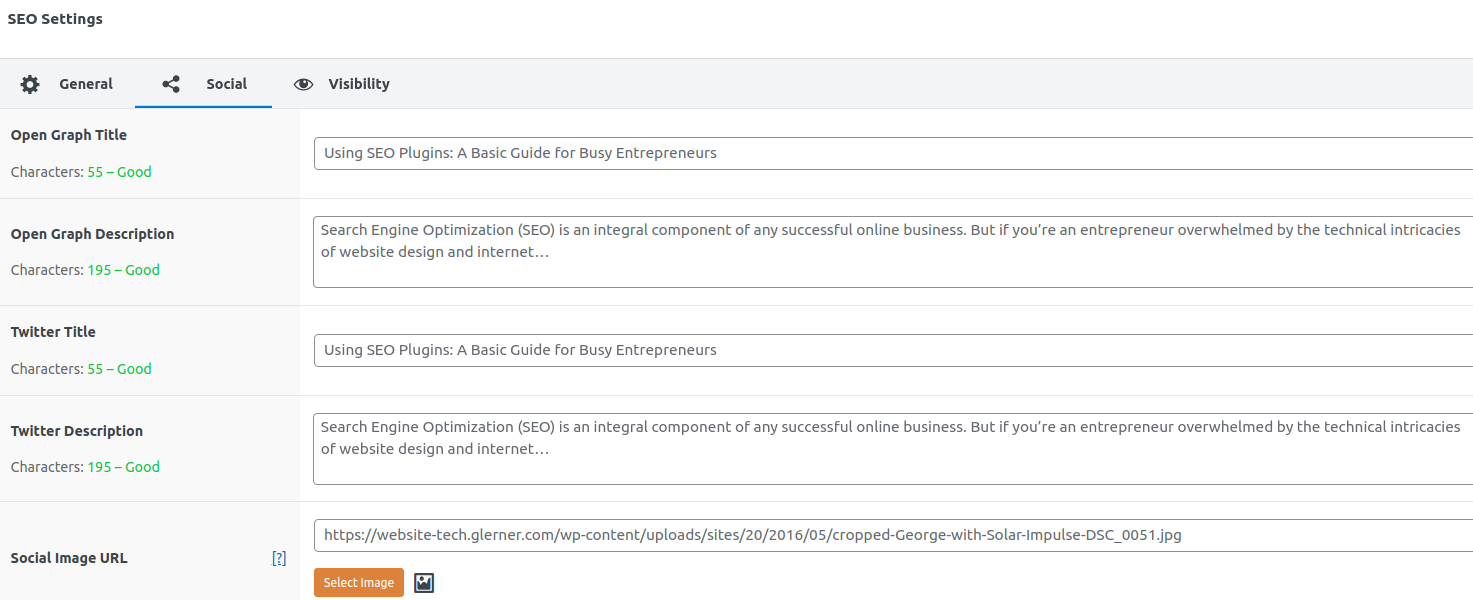
    One of its standout features is the ability to let you tailor images for various social media platforms. The SEO Framework seamlessly supports and enables further customization of the Open Graph, Facebook, and Twitter Cards protocols. (Basically all social media sites use either the Facebook or Twitter extensions to OpenGraph, so you only need to set the image and description for those two.)

    This means when you share your posts on social media platforms, you can specify text and images that align with each platform’s preferred dimensions.

    If you don’t set a custom image, the plugin will default to using the post’s Featured Image (each social media site will crop or resize how it thinks is best) or a fallback image you set.

    If you don’t set a custom description, each social media site will use your page’s Excerpt.

    Whether you select an image and text specific for search engines + Facebook + Twitter, or use the default for the page, your content always looks its best wherever it’s shared.

    Testing Your Google, Facebook, Twitter descriptions

    To get a sense of how Google perceives your site, search for “site:yourdomain.com” on Google. This will display all indexed pages of your site. For a deeper dive, Google Search Console provides comprehensive analytics and insights.

    Test with Facebook’s Open Graph Debugger

    Test with Twitter Card Validator

    Google Webmaster’s Cached HTML Improvements Report

    Final Thoughts

    Optimizing your WordPress site for search engines doesn’t have to be overwhelming. With the right plugin and a bit of guidance, you can effectively enhance your site’s visibility.

    Focus on delivering value to your audience, understand their needs, and let the tools handle the technical side of things. Your vision of making a positive impact within your community through your online platform is not only achievable but also commendable.

    Happy optimizing!

  • Easily Market ClickBank Products to More Twitter Followers

    I found this great tool to help you:

    • Find more people interested in your niche
    • Send them tweets relevant to their interests
    • Promote products you market, both your own and ones on ClickBank
    • Find more products to market, that are in your niche as well as the best-selling niches.

    Tweet-o-Matic Profiteer: Easily Promote the ClickBank Marketplace With Our Market-Smashing Twitter Software

    Combine automating targeted Twitter posts, with marketing your ClickBank affiliate products. Increases your Twitter followers, places ads for your affiliate products. Know what are the most profitable products in the most popular niches. You don’t need to know anything about affiliate marketing or search engine optimization. Need to be able to write emails. Set up as many accounts as you want. (Write tweets relevant to your followers, and they are more likely to follow your leads. Guide book goes over how to use the software and market well.)

    Get the Tweet-O-Matic Profiteer now and, you’ll make more money.

  • WordPress add-ons to improve your blog

    You want to have people find what they want to read on your blog? Well, you can customize your WordPress blog so that is easier.

    Is the appearance of your blog important to you? Do you want to have the appearance match the mood and style of your writing? You can have that.

    Changing the overall appearance of your blog

    There are hundreds of ways you can customize how your WordPress blog looks, and dozens of great features you can add. So many you could spend hours just picking which ones interest you the most.  Then you’d have to spend hours installing them, testing them, finding out which options to use. Even if you’re tech-minded, it’s too much to do, and trying out different looks is not what you should be spending your time on.

    When you are starting to blog, what is most important is writing. So here’s what I found that experts have recommended or people have said they really want to have on their blogs.

    Start with these WordPress add-ons, and configure them this way. (Later, when you’re rich and famous and have lots of people reading your blog, you can add more enhancements if you want to.)

    Themes and Appearance

    I found many themes I liked (themes specify the overall structure of how is information organized on the page) at http://alexking.org/projects/wordpress/themes and styles (the colors and fonts that make up the “look” of your blog) at http://alexking.org/projects/wordpress/styles and was done searching. I’m using the Carrington template, and haven’t changed the style: it looks professional, easy to read, and is organized better while I am composing my posts than the default template is.

    Social Networking: how do I let people on LinkedIn, Twitter, Facebook, etc know I’ve blogged?

    Twitter lets people who are interested in what you are doing stay connected with you. Let them know a mixture of your activities, what you enjoy, what you need, what you are working on, and what you offer. With these tools, you very easily post on Twitter what you blogged about.

    Twitter Tools –
    http://wordpress.org/extend/plugins/twitter-tools/
    Creates a complete integration between your WordPress blog and your Twitter account. Create a daily digest post of your tweets. Create a tweet on Twitter whenever you post in your blog, with a link to the blog post.

    Twitter Widget Pro –
    http://wordpress.org/extend/plugins/twitter-widget-pro/
    A widget that properly handles displaying twitter feeds on the sidebar of your blog, including @username and link parsing. It supports displaying profiles images, and even lets you control whether to display the time and date of a tweet or how log ago it happened (about 5 hours ago, etc). Requires PHP5 on your server.

    Facelook WordPress Plugin –
    http://wordpress.org/extend/plugins/facelook-facebook-badge-wordpress-plugin/
    Brings your FaceBook badge into your blog

    How can I make it easier for people to find what they want to read? (How do I do search engine optimization on blog posts?)

    All in One SEO Pack –
    http://wordpress.org/extend/plugins/all-in-one-seo-pack/
    I’ll write a tutorial on using this tool well. Briefly, you can easily change all the important elements of your blog posts so search engines bring people to the specific posts they are interested in.

    I want to know what people think of what I write. Can I have people rate my posts?

    Rating of posts and pages and comments
    http://wordpress.org/extend/plugins/gd-star-rating/
    (the manual is available at http://wp.gdragon.info/plugins/gd-star-rating/, or direct link for the GD Star Rating User Guide 1.0.5 – http://wp.gdragon.info/download/12/)

    My blog is very important. How can I back it up?

    WP-DB-Backup –
    http://wordpress.org/extend/plugins/wp-db-backup/

    I have great quotes I’d love to put on my blog to make it more interesting. Can I?

    Quotes Collection
    http://wordpress.org/extend/plugins/quotes-collection/
    This adds a nice interface to add, edit and manage quotes. Quotes can be displayed in a page by placing a piece of code (quick tags), selected by source or tag . This also helps keep your blog entries fresh, in a way that adds content, that search engines love.

    I want to mention books, and have links to Amazon near them. How do I do that?

    Amazon Showcase WordPress Widget –
    http://wordpress.org/extend/plugins/amazon-showcase-wordpress-widget/

    Where’d you get those amazing space photos from?

    NASA Image Of The Day –
    http://wordpress.org/extend/plugins/nasa-image-of-the-day/